People · St. John's, Newfoundland and Labrador
Published
How to Track Metrobus in St. John’s: BusBoard NL and Travel Planning
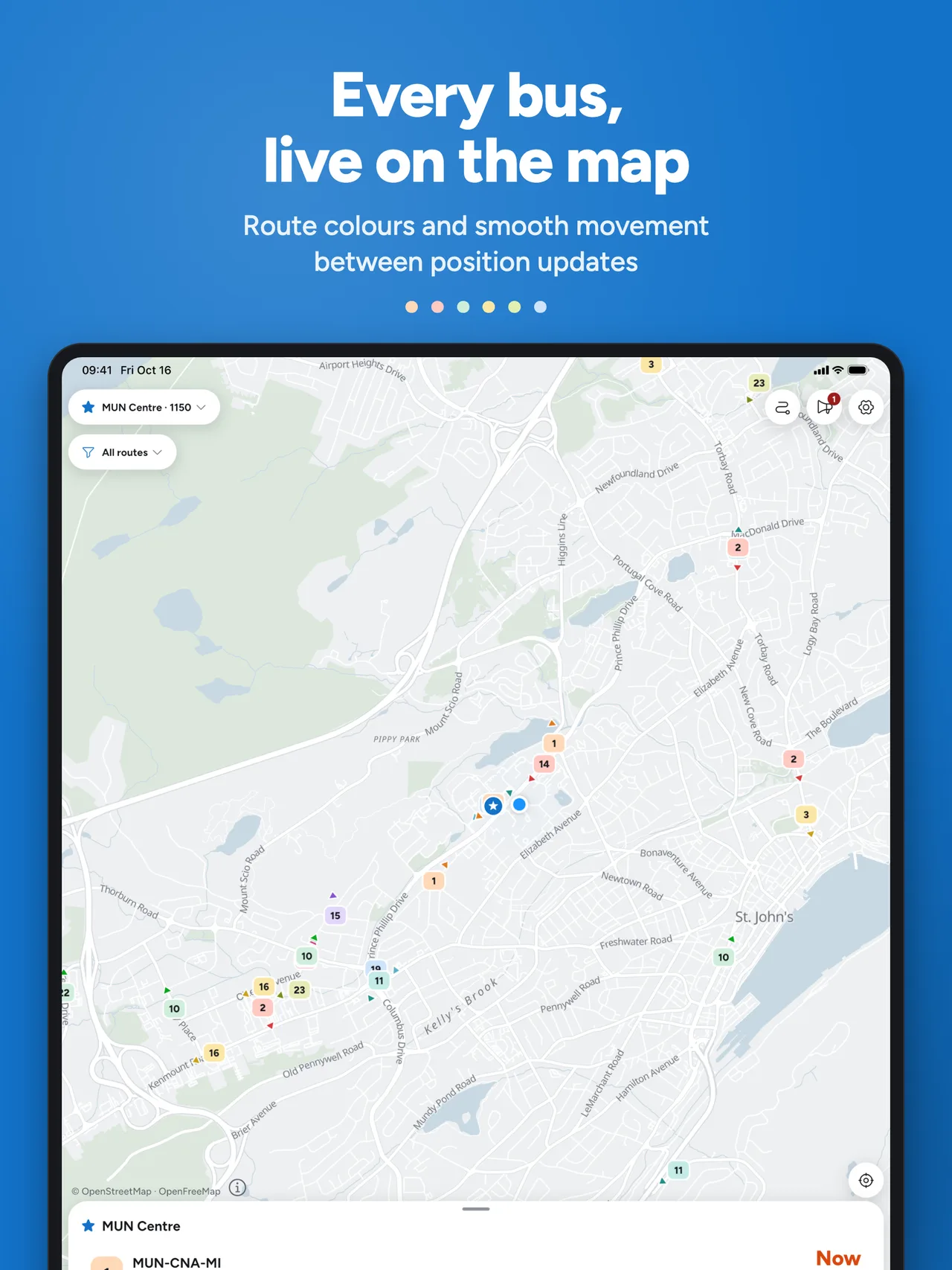
BusBoard NL is a free independent app for viewing Metrobus vehicles, nearby stops and arrival predictions. Use it alongside Metrobus’s official route and service information. A live map helps with the wait; your direction, connections and return journey still need a plan.
Facts checked
In this story
Give the bus stop less of your afternoon
There are better uses for a November afternoon than staring into the distance, wondering whether a bus is late, early or quietly pursuing a different career. In St. John’s, a live vehicle map can make that wait considerably less mysterious. BusBoard NL puts Metrobus positions and arrival information in one place, so you can look for a bus rather than merely hope one exists.
Its Canadian App Store listing describes a free app for iPhone and iPad, built specifically around Metrobus data. It is an independent product, not an official Metrobus service. That is worth knowing without making it a drawback: the app organises information; the operator runs the vehicles and publishes the service.
The strongest reason to use a tracker is a small, ordinary decision. Has your bus already passed? Is the vehicle approaching the stop or still well away? Is the nearby stop actually the right one? Answering those questions is more useful than a screen full of features you have no time to explore.
Source: BusBoard NL: developer description on the Canadian App Store
Source: Metrobus: official passenger information
Start with the stop and the direction
BusBoard’s advertised tools include a live map, an arrival board for a selected stop and nearby-stop discovery. Begin with your destination and the direction you need, then look up the appropriate stop. The nearest pole is not automatically the right pole. Transit has always had a slightly unkind sense of humour about the opposite side of the road.
Read a route number together with its direction and stop. A bus marker elsewhere on the map may be a useful clue, but it does not mean that vehicle is coming to you. Check the selected stop’s arrivals rather than assuming any bus on the familiar route will help.
For a journey you make often, work out the correct stop while you are warm and unhurried. The first morning of bad weather is an unnecessarily ambitious time to learn which side of an unfamiliar junction you need. A little preparation saves repeated phone checking and the distinctive disappointment of watching the right bus leave from the wrong pavement.
Source: BusBoard NL: developer description on the Canadian App Store
Live information and a timetable do different jobs
A timetable describes the intended service. Live information reflects reported vehicle positions and predictions. One is useful for deciding when to travel; the other helps you understand what is happening to that journey now. Neither should be asked to do the other’s entire job.
Use Metrobus’s official information for the current route, operating day and service changes. An independent tracker cannot make an unserved destination part of a route, add a late departure or overrule a detour. When your normal journey behaves unexpectedly, look for the service explanation before assuming the map is broken.
Residents welcomed the local app’s straightforward approach and asked for refinements such as easier vehicle following and more precise trip planning. Those requests describe real commuter needs. They are not a promise that every requested feature is already in the version on your phone. Judge the current app by what it offers, not a wish list attached to an older announcement.
| Tool | Use it for | Its limit |
|---|---|---|
| Official route and timetable information | Choosing a route, travel day and planned departure | A schedule alone cannot show every delay |
| Live map and arrival board | Understanding where a reported vehicle is now | Feed delays and missing data can affect the picture |
| Your full journey plan | Connections, walking time and the return trip | A single approaching bus is only one part of the outing |
Source: Metrobus: official passenger information
Source: Local developer introduces BusBoard NL, October 2026
Plan the last leg before the first one
For an appointment, leave time between the expected arrival and the time you need to be inside. Walking from the stop, crossing a road and finding an entrance count as travel. A bus can be perfectly on time while its passenger is still late.
Check the return before leaving home, particularly for an evening outing or a weekend trip. A convenient outward bus does not establish that the same pattern runs late at night. If you need a connection, consider what happens if the first vehicle arrives after the second has left. That is a more useful precaution than repeatedly refreshing the map once the problem has happened.
Live predictions can change, and missing information does not by itself establish that a bus has been cancelled. Allow a sensible margin and turn to the operator when the feed is unclear. Metrobus’s site was not readable in our latest automated check, so this guide does not supply a guessed fare table or a copied timetable.
The reward is modest and worthwhile: a better-informed wait, a clearer route and fewer unnecessary minutes outside. No app can improve the weather. It can, however, stop the bus from being the most mysterious thing in it.
Source: Metrobus: official passenger information
Source: Local developer introduces BusBoard NL, October 2026
Source: Local developer introduces BusBoard NL, October 2026
Questions people ask
What is BusBoard NL?
An independent Metrobus tracking app with live vehicle and stop-arrival tools.
Source: BusBoard NL: developer description on the Canadian App Store
Is BusBoard NL an official Metrobus app?
No. Its listing says it is independent and unaffiliated with Metrobus Transit.
Source: BusBoard NL: developer description on the Canadian App Store
Is BusBoard NL free?
The Canadian App Store listing marks it free. Check your platform’s current listing.
Source: BusBoard NL: developer description on the Canadian App Store
Can I use BusBoard NL on an iPhone or iPad?
The reviewed listing supports iPhone and iPad. Check compatibility with your own device.
Source: BusBoard NL: developer description on the Canadian App Store
Can the app help me find nearby stops?
Nearby-stop discovery is an advertised feature. Check the stop’s route and direction before travelling.
Source: BusBoard NL: developer description on the Canadian App Store
Where does BusBoard get its transit information?
Its listing identifies Metrobus as the data source.
Source: BusBoard NL: developer description on the Canadian App Store
Does a moving bus marker guarantee an exact arrival time?
No. Reported positions and predictions can lag or change. Leave a margin.
Source: Local developer introduces BusBoard NL, October 2026
Where should I check Metrobus route changes?
Use Metrobus’s official service information rather than relying only on an independent map.
Source: Metrobus: official passenger information
How should I plan a Metrobus connection?
Check both routes, allow time to change stops if needed and consider the next departure if a connection is missed.
Source: Metrobus: official passenger information
Should I check the return bus before an evening out?
Yes. Confirm the travel day and last useful return rather than assuming daytime frequency continues.
Something changed? Tell us about a correction.